Cozy Games That Actually Relax You

I spend 20+ hours with each game before recommending it. No AI lists, no rushed reviews—just cozy games that genuinely help you unwind. Find your next favorite escape.

⌘K
游戏封面: Peggy's Post

Peggy's Post

Peggy’s Post leans into the tactile joy of desk work: analogue scales, chunky stamps, rulebooks, maps, and ship flags. The whole thing feels like sitting at a wooden counter in a cozy lighthouse, calmly sorting out the world’s mail. You spend each in-game day serving customers, calculating postage, and routing parcels to the correct ships. Mistakes cost you money, but the tone stays gentle and forgiving. There’s no war, no grim moral choices, and no harsh penalties — just soft pixel art, ambient music, and a satisfying workflow loop. Why this game is truly cozy Peggy’s Post stands out as a cozy game for a few key reasons: No real-time pressure There’s no countdown timer pushing you to rush. You can pause, check the rulebook, rethink your route, and play at your own speed. It’s more about finding a rhythm than beating a clock. Low-stakes, calm goals The only real objective is paying back a tiny loan and keeping your post office afloat. Even if you mess up a parcel or two, you’re adjusting your system, not ruining anyone’s life. Soothing “paperwork” loop Fans of Papers, Please-style logic puzzles will recognise the structure, but Peggy’s Post swaps the anxiety for comfort. It’s about organising, not suffering. Warm, focused atmosphere Soft pixel art, gentle sounds, and the lighthouse setting all work together to create a quiet, focused space. Many players describe Peggy’s Post as their new “go-to cozy game” when they need to decompress. If you’re searching for a cozy postal game that gently engages your brain without stressing you out, Peggy’s Post delivers. Gameplay Breakdown In Peggy’s Post, your day-to-day postal life looks something like this: Start the day & read the notes Each day may introduce new rules, routes, or tools. The 7-day mode unlocks mechanics gradually so you’re never overwhelmed. Weigh and price parcels Customers arrive with packages headed to different destinations. You: - Weigh the parcel on the scale - Check the price chart for the correct postage - Combine stamps to hit the right value as neatly as possible Match routes and ships The world map is divided into coloured sea routes. Each route corresponds to a ship with a matching flag. Your job is to place the parcel on the correct blueprint so it reaches the right part of the world. End-of-day income and upgrades At the end of each day, you see your earnings after mistakes. You can spend money on: - Extra stamp packs - Useful postal tools (like stamp helpers or better charts) - Route-related upgrades that make future days smoother Story mode vs. Endless mode - 7-Day Mode gives you a clear goal (repay the loan) and slowly introduces new systems. - Endless Mode lets you enjoy the full rule set from the beginning and sink into pure postal flow. Controls are simple point-and-click with a few handy keyboard shortcuts for flipping through your rulebook and changing views. Mini Tips Start with the 7-day run It’s the best way to learn Peggy’s Post. Mechanics unlock gradually and the loan gives you a gentle sense of purpose. Use the scale for stamps too Place just your stamps on the scale to see their value — perfect when you’re trying not to overpay postage. Always check the colours and flags Route colours on the map match ship flags on the blueprints. If your parcels keep going astray, this is the first thing to double-check. Invest in comfort upgrades Quality-of-life tools make later days feel even more relaxing. A few smart upgrades turn Peggy’s Post from “cozy puzzle” into full-on brain massage. Watch your real clock It’s very easy to say “just one more day” and realise an hour has vanished. Consider this your soft warning. FAQ Is Peggy’s Post stressful? Peggy’s Post is mostly calm and methodical. You can absolutely make mistakes, but there’s no harsh timer, no shouting NPCs, and no dark story twists. It’s closer to a cozy postal puzzle game than a high-pressure sim. How long does a run take? A single 7-day run of Peggy’s Post can fit comfortably into an evening, but the endless mode is where many players lose track of time. It’s an easy game to play “just one more day” with. Is Peggy’s Post good for cozy gamers? Yes. If you like low-pressure management games, tactile interfaces, or paperwork-style puzzles that feel safe and contained, Peggy’s Post is an excellent cozy choice. Do I need a powerful PC or controller? No. Peggy’s Post runs on modest hardware and is designed for mouse/trackpad plus keyboard. No controller required. If you’re looking for a cozy post office game that mixes gentle brainwork with lighthouse vibes, Peggy’s Post is absolutely worth a spot on your comfort-game playlist.

Life Sims
游戏封面: The Round-about Orchard

The Round-about Orchard

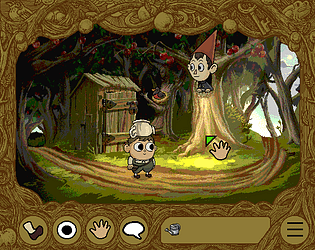
The Round-about Orchard is a tiny, cozy Over the Garden Wall fan game – a two-room, point-and-click adventure that takes about 15 minutes to finish. You’re dropped back into The Unknown for a short autumn walk full of gentle puzzles, warm pixel art, and familiar voices. Created by adventure game developer Julia Minamata (The Crimson Diamond), this little game reunites key Over the Garden Wall collaborators: series creator Patrick McHale, background artist Levon Jihanian, musicians The Blasting Company, and Elijah Wood recording new lines as Wirt. Animation is handled by Ilya Schwarz, and the result feels like a tiny, interactive episode. The Round-about Orchard was commissioned by Requiem Cafe in Anaheim, California, for their 2025 Over the Garden Wall Halloween fan event, and is now playable for free in your browser as an HTML5 game. On itch.io it’s rated 4.8 out of 5 with players calling it “lovely”, “charming”, and “captures the warmth and atmosphere of the show perfectly”. Why this game is truly cozy A short, self-contained autumn walk The Round-about Orchard is deliberately small: just two backgrounds and a bite-sized story designed to fit into a single cozy sitting. You can finish it in around 15 minutes, making it perfect for an evening break or a cup-of-tea session without committing to hours of gameplay. Gentle point-and-click puzzles, no stress This is classic point-and-click adventure design, with zero combat and no fail states. You explore, click on things, collect a few items, and solve light environmental puzzles. Players mention getting “a little confused at some parts”, but mostly describe the game as “fun”, “delightful”, and “so cute” rather than difficult or punishing. Atmosphere straight out of The Unknown Fans repeatedly call out how well the game captures the warmth and mood of the show – from the backgrounds that feel like a cross between OTGW and classic Monkey Island, to the gentle music and sound design. Greg’s dialogue is frequently praised as “adorable” and “very fun to read”, and having Elijah Wood back as Wirt makes the whole experience feel authentic. Environmental storytelling with a soft emotional core The game’s central orchard puzzle isn’t just a logical challenge – it’s also a metaphor. Players highlight how the “future tree” and the idea that things get better in the future when you do good in the present create a simple but effective emotional through-line. Others praise the “environmental storytelling” and the way the forest “loop” is never stated outright, leaving you to piece it together yourself. Cozy for fans and newcomers alike Even players who have never seen Over the Garden Wall say they enjoyed the writing and characters, especially “the boy with the teapot hat” and his tiny gasps. For long-time fans, it feels like coming home to The Unknown; for new players, it’s just a charming autumnal adventure with great dialogue. Gameplay Breakdown In The Round-about Orchard, you’re effectively stepping into a mini interactive episode: Arrive at the orchard You start in a rustic orchard clearing that feels straight out of OTGW: trees, paths, a mysterious shed, and little environmental hints about what’s going on. Explore and click on everything With a traditional point-and-click cursor, you move around the scene, interact with objects, and talk to your companion. A lot of the charm comes from the sheer amount of unique interaction dialogue – it’s very worth clicking on everything just to hear Greg and Wirt react. Solve light inventory puzzles You’ll pick up a few items, find clever ways to use them (like locating a key hidden near a fallen tree, or finding something to dig with), and gradually unlock the path forward – including how to deal with a locked shed and the orchard’s strange time-loop twist. See the orchard’s “tomorrow” The game plays with the idea of a future orchard, where what you do now changes what you find later. When the metaphor finally clicks, it’s simple, sweet, and very on-brand for Over the Garden Wall. Enjoy the payoff and credits The ending is short but warmly received – many players feel the payoff “fits the show” and that the whole thing plays like a lost OTGW story rather than just a quick fan project. Controls are intentionally simple: just mouse or touch input to move the cursor, click hotspots, and interact with exits. There’s no UI clutter – it’s designed to be intuitive even if you don’t typically play adventure games. Mini Tips Click on absolutely everything The writing shines in the little details. Objects often have custom lines, and there are lots of tiny reactions scattered across the two scenes. Remember it’s two rooms, not a huge world The game is small by design, so if you’re stuck, it usually means you missed a hotspot or an item interaction in one of the two scenes – not that there’s a whole map hidden off-screen. Check around the fallen tree Light spoiler: if you can’t get a certain lock open, explore around the fallen tree and its branches more carefully. There’s something there that can help you. Use the walkthrough if you need it The itch.io page includes a PDF walkthrough for anyone stuck. It’s there so you can enjoy the story and vibes without getting frustrated by a single missed pixel. Play with sound on The Blasting Company’s music and the voice work (including Elijah Wood as Wirt) are a big part of the experience. If you can, use headphones or speakers instead of muted browser mode. FAQ Is The Round-about Orchard stressful? Not at all. There’s no combat, no timer, and no game-over screen. The puzzles are gentle, the tone is warm, and the worst thing that can happen is that you wander around the orchard a bit longer while you figure things out. How long does The Round-about Orchard take to finish? It’s designed as a 15-minute adventure, and most players complete it in a single sitting. If you like to click on every interaction and soak in the backgrounds, you might stretch it a little longer, but it’s still very much a short, cozy experience. Do I need to know Over the Garden Wall to enjoy it? No. Fans of the show will definitely get extra emotional resonance and nostalgia, but even if you’ve never watched OTGW, you can still enjoy the writing, characters, and autumnal atmosphere. Is this an official Over the Garden Wall game? It’s a fan game that calls itself one, but it’s made in collaboration with the show’s creator and several original artists and musicians. It’s not an “official Cartoon Network product”, but the involvement of the original team – plus Elijah Wood’s voice work – makes it feel very close to canon in spirit. Where can I play The Round-about Orchard? You can play it for free in your browser via the itch.io page (HTML5). It also works via the itch app and is playable on some mobile browsers, though it’s primarily designed for desktop. The game is short, lightweight, and doesn’t require a powerful PC or a controller – just a mouse or touch input. If you want a cozy point-and-click adventure that feels like a lost Over the Garden Wall vignette, The Round-about Orchard is absolutely worth one quiet evening in your cozy-game rotation.

Platform
游戏封面: Incredibox - Sprunki

Incredibox - Sprunki

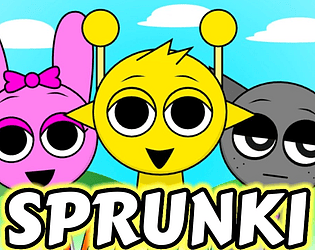
Incredibox - Sprunki is a fan made music game and mod built on the Incredibox formula, where you drag sound icons onto little beatbox characters to build tracks. Instead of plain humans, the cast is a set of bright, cartoony creatures from the Sprunki universe, each tied to a looped beat, effect, melody or vocal. This version of Sprunki plays like a full Incredibox style session: you start with seven blank characters on a stage, a strip of roughly twenty icons along the bottom, and complete freedom to layer them into whatever chaotic or surprisingly chill mix you want. The normal mode leans into neon colours and playful animation; if you want something darker you can also trigger a horror mode with more intense visuals and sound. Originally created as a fan project and shared through mod platforms and browsers, Sprunki has since been ported and rebuilt multiple times, including open source and moddable versions so the community can keep expanding it. Why this game is truly cozy Loop based music with no fail state There is no score, timer or game over. You simply drag icons, listen, swap things in and out and find the moment where your mix feels right. You can sit with it for five minutes or lose an hour without noticing. Colourful characters with distinct sounds Every Sprunki character has its own visual identity and sound role, from solid drum beats to strange background effects or sweet little melodies. Watching the stage fill up with a rainbow of moving creatures is half the fun; realising how their loops interlock is the other half. Easy to learn, satisfying to master The interface is point and click only. Anyone can get a decent groove going by randomly dropping icons, but if you enjoy tinkering you can learn which sounds sit well together, how many vocals is too many, and which combos create really punchy choruses. Chill creativity with optional chaos You can stay completely in normal mode and treat Sprunki as a colourful toy for relaxed music making. If you feel like leaning into the horror twist, you can also flip into the darker mode and build a harsher, glitchier track. The mood is mostly up to you. A very loud fan community Because the open source builds are moddable, there are countless edits, phases and spin off mods. That means lots of shared mixes, favourite character debates and fan art to browse when you are done mixing. Gameplay Breakdown Incredibox - Sprunki follows the classic Incredibox structure with a Sprunki skin and a horror twist. Pick your platform and load a session The game runs in a browser and in downloadable builds. When you start a session you will see a row of empty characters standing in the middle and a strip of icons along the bottom of the screen. Drag icons onto polos to add sounds Each icon belongs to one of four categories beats, effects, melodies and vocals. Drag an icon onto a character to dress them up and start their loop. You can stack up to seven loops at once, swap icons between characters, or remove an icon to mute a sound. Build your mix layer by layer Most players start with beats, then add a bass style melody, then decorate the mix with effects and a couple of vocals. Nothing stops you from doing the opposite, but the game tends to sound more satisfying if you set up a solid rhythm first and treat the rest as colour. Trigger the horror mode with the Black icon One special vocal icon, usually drawn as a black top hat, is tied to the horror mode. Dropping that onto a character temporarily fades the screen to black and swaps the stage into a horror version where everyone looks injured or uncanny and the audio becomes more intense. You can still add and remove sounds in this mode just like before. Explore secrets and gallery details Sprunki also hides little extras such as bonus characters that appear when you meet certain conditions or type secret phrases, and a gallery that shows doodles and tiny lore teasers about the cast. None of this is required to enjoy the music, but it is a nice reward for curious players. Whenever you get bored of a mix you can use the reset button at the top of the screen to clear all characters and start fresh. Mini Tips Start with two or three beats and one melody before adding lots of effects Try muting individual characters one by one to hear what each loop is really doing in your song Use vocals sparingly if you want a smoother mix and stack them if you want deliberate chaos If you prefer cozy vibes, simply avoid the black hat icon so you do not enter horror mode at all If you get into Sprunki long term, look into open source or moddable builds so you can experiment with your own sound sets or character art FAQ Is Incredibox Sprunki scary or cozy It can be both. Normal mode is bright, playful and perfectly fine if you just want low pressure music play. Horror mode adds blood, injuries and more unsettling sound design, so it is better suited to teens and older players who like a bit of creepiness mixed with their beats. How long does a typical session take There is no built in end point. Many people hop in for ten minutes to clear their head, others sit for an hour carefully balancing layers or recording several different mixes. Is this an official Incredibox game No. Sprunki started life as an unofficial fan mod built on the original Incredibox framework and has since grown into its own ecosystem of ports and fan projects. It is inspired by Incredibox but made by a different creator. On what devices can I play Sprunki You can play it in a browser on a computer, and there are downloadable versions for desktop and mobile depending on the port you choose. If one site stops hosting it, there are usually mirrors or updated builds elsewhere in the community. What age rating and content warnings should I know about The normal mode is suitable for most players who are comfortable with cartoon style characters. The horror mode includes stylised gore, visible injuries and unsettling faces, along with tenser audio, so it is closer to a teen rating. If you or your kids are sensitive to blood or horror imagery, stay in normal mode or skip Sprunki entirely. How is Sprunki different from regular Incredibox Mechanically it works almost the same, but the cast is made up of Sprunki creatures instead of human beatboxers, the sound set has its own flavour, there is a built in horror transformation, and the mod scene around it is especially active. If you already like Incredibox and want something weirder and more chaotic, Sprunki is an easy next step. If you enjoy experimental music toys, character focused fan communities and a mix of cosy creativity with optional creepiness, Incredibox Sprunki is a fun rabbit hole to fall into.

Music
游戏封面: The Freak Circus

The Freak Circus

The Freak Circus is an 18+ dark visual novel about a travelling Circus of Horrors and two very obsessive clowns who decide your life is their new favorite show. You play as a tired café worker whose routine gets wrecked the day you cross paths with Pierrot, a silent yandere performer. His fixation on you starts immediately – and then Harlequin, his seductive stage rival, jumps into the “game” and turns everything into a dangerous competition for your attention. The current version is a prototype / in-progress demo with multiple routes and endings, original art, animated transitions, and a fanbase that’s already spiraling into lore, theories, and replay spreadsheets. It’s available on PC and mobile (HTML5 / downloadable), and supports English, Portuguese (BR), and Chinese. This is a horror romance with strong content warnings: blood, death, abuse, kidnapping, non-consensual drug use, and other heavy topics. Definitely not for minors or anyone looking for a soft, low-stakes cozy night. Why this game is truly cozy (for dark romance gremlins) A circus that feels alive (and hungry) The Freak Circus leans into circus / carnival aesthetics hard: striped tents, spotlight stages, masks, mirrors, and a town plastered with flyers. The art isn’t just static sprites – there are transitions, flashes, and animated bits that make scenes feel like a show instead of a slideshow, which players keep praising. Yandere clowns with actual personality Instead of generic “scary boyfriend #1”, Pierrot and Harlequin feel distinct: Pierrot – quiet, intense, off-putting in the way only a clown who murders on stage for you can be… and yet players are hopelessly obsessed with him. Harlequin – bold, flirty, theatrical, and a little too eager to turn every interaction into a performance (or a power play). A lot of the “cozy” here is emotional indulgence: being the center of this unhinged rivalry, watching them orbit you, and picking your poison. A demo that already feels rich Even in prototype form, the game has multiple endings (1 bad, 3 open), hidden scenes, and enough branching that people are literally making lore books and flowcharts to track routes. It’s the kind of game you curl up with for an evening and then suddenly realize you’ve been replaying for hours to see “just one more outcome”. Lore bait for theory crafters The story hints at angels, monsters, and a bigger mythology behind the circus. Comments are full of theories about who (or what) the protagonist really is, how they might connect to the “angel” in Harlequin’s story, and where Pierrot sits in the circus hierarchy. If you like piecing together hints from little visual details and throwaway lines, this is very satisfying brain-food. A very loud but very loving fanbase Players are down bad enough to: Call it their favorite game Write long breakdowns of every choice Beg for extra routes (Doctor route, Jester route, everyone route…) Replay the game across browser and PC “just because” If your version of cozy includes screaming in all caps about clowns with knives in a Discord server at 2am, this absolutely qualifies. Gameplay Breakdown In The Freak Circus, you’re mostly reading and making choices – but the way those choices land is what makes it tense and addictive. Ordinary café, not-so-ordinary flyers The game opens in town: the circus has been spamming flyers and stunts for days. You’re on your way to another shift at the café when a strange man and a fateful ticket start pulling you toward the circus. First encounter with Pierrot You meet Pierrot in a way that immediately marks you as “different” to him – usually thanks to your empathy or how you react to something horrifying on stage. From that point on, he’s quietly locked onto you. Welcome to the Circus of Horrors You’re drawn into the circus grounds: tents, mirrors, off-limits areas, and backstage glimpses of things you probably shouldn’t see. Dialog choices start shaping how trusting, fearful, or confrontational you are, and who notices. Harlequin enters the game At some point, Harlequin steps in as the charismatic rival. Where Pierrot is possessive and unnerving, Harlequin is bold and teasing. Your responses decide who feels encouraged, who feels threatened, and how far each is willing to go to “win”. Branching scenes, hidden moments, and bad ends Different choices unlock: Hidden scenes (for example, who ends up in your room at night) Variations on key confrontations A Bad Ending where things go violently wrong Several open endings that leave the story dangling but full of implications The current build covers two in-game days with all these branches. A third day and full character endings (Pierrot, Harlequin, MC, and an “all together” route) are planned in future updates. Mini Tips Save often, especially before big choices This is a visual novel where choices matter, and there is a bad end. Drop manual saves before major scenes (performances, tent choices, bedroom scenes) if you want to explore branches without replaying entire days. Lean into one clown at a time If you want to chase specific scenes, try answering consistently in favor of either Pierrot or Harlequin instead of flip-flopping. The game responds to whose attention you’re feeding. Check off-limits areas when you can Tents, tickets, and “you’re not supposed to be here” moments often hide important lore or ominous hints. If you get the chance to peek somewhere forbidden, it’s usually worth the risk. Watch for visual and color cues Tent colors, eye colors, and background details aren’t random. Fans have pulled a lot of theory fuel from small visual differences between scenes – especially around the angel story and the striped tents. If a scene bugs out, try returning from the menu Some players mentioned occasional hiccups (like CGs appearing without text during a specific tent scene). Backing out to settings or right-clicking to re-enter the text box usually fixes it without losing progress. FAQ Is The Freak Circus actually cozy? Not in the usual sense. It’s an 18+ horror romance with yandere themes, gore, abuse, and kidnapping. The “cozy” factor is more about emotional comfort for fans of dark otome/yandere games – being the center of an intense, obsessive story – rather than something soft or relaxing. How long is the current demo? Expect a few hours if you’re just reading through once, and a lot longer if you start chasing all endings and hidden scenes. Some players have already spent 5+ hours replaying to map every route and outcome. Is the game finished? Not yet. The current version is marked as a prototype/demo with: 1 bad ending 3 open endings 5 characters overall 2 in-game days fully playable Future updates will add a third day, full endings for Pierrot, Harlequin, and the protagonist, plus an “all together” route. What platforms and languages does it support? The Freak Circus runs on: HTML5 (browser) Windows, macOS, Linux Android (APK) Languages available so far: English Portuguese (BR) Chinese (Simplified) Is The Freak Circus free to play? Yes. The game is name-your-price – you can play for free, or toss the developer a tip if you want to support development and future updates. What content warnings should I know about? The game is recommended 18+ only and includes: Blood, death, murder, light gore Allusions to cannibalism Physical and emotional abuse Kidnapping and confinement Non-consensual use of drugs Strong language Screen shaking and intense scenes If these themes are triggering, it’s best to skip this one. If you’re into male yandere, clown / circus horror, and choice-driven visual novels where romance and danger are hopelessly tangled, The Freak Circus is absolutely worth a late-night playthrough.

Novel
游戏封面: A Little to the Left

A Little to the Left

A Little to the Left is a cozy, design-y puzzle game about putting everyday chaos back in order: lining up pencils, sorting spoons, stacking boxes, and peeling way too many stickers off fruit — all while a mischievous cat occasionally smacks your hard work out of place. You’re not solving math problems or Sokoban grids here; you’re tidying up small household scenes until they “feel right”. Each level is a self-contained vignette: a messy drawer, a cluttered shelf, a stack of mail, a row of picture frames that are just… a little to the left. The game comes with 100+ hand-crafted puzzles, plus Daily Tidy Delivery (a fresh puzzle every day) and extra packs like the Cupboards & Drawers DLC for even more things to neatly arrange. It’s available on PC, PlayStation, Xbox, Nintendo Switch, and mobile (iOS/Android). Why this game is truly cozy Organization as a core mechanic A Little to the Left is basically organizing as game design. Every scene is “a little out of sorts”, and your job is to find a pleasing logic: sort by size, colour, shape, pattern, expiry date, or something sneakier create symmetry, pleasing gradients, or neat little clusters That “ahhh, everything fits perfectly now” moment is the entire point. Reviews often describe it as relaxing, satisfying, and “busy work for the soul”. Puzzles that reward observation, not speed There are no timers, no scores, and no fail screens. You can drag objects around as much as you like, undo mistakes instantly, and sit with a puzzle for as long as you need. It’s all about noticing small details: tiny scratches on rulers, label directions, colour bands on cables, etc. Multiple solutions for many levels A lot of puzzles have more than one valid solution: sort pencils by length or by eraser colour group objects by brand or by pattern arrange items by height or by number of stripes The game even shows how many solutions exist, turning each level into a mini “how many ways can I make this satisfying?” challenge. A very cat-accurate chaos factor Your in-game cat occasionally hops into a puzzle to swipe items, knock things over, or sit directly on what you’re trying to fix — exactly like a real cat “helping” you tidy. It’s never punishing; it’s just a little playful friction that keeps the vibe warm and personal instead of sterile. Cozy… but not brain-off Visually and sonically it’s peak cozy: soft art, gentle music, lovely little sound effects. But some puzzles are genuinely tricky; a few players on cozy forums note that it can be more mentally demanding than it looks, even though you can always use hints or skip. If you like gentle but thoughtful puzzling, it hits a sweet spot. Gameplay Breakdown At its core, A Little to the Left is an observational, drag-and-drop puzzle game: Each level is a small messy scene You might see: - a desk with scattered stationery - a row of books in the wrong order - jars of spices with mismatched labels - an over-stickered piece of fruit Something is “off”, and your job is to discover what the underlying rule should be. You manipulate objects directly You use mouse, controller, or touch to: - drag items around - rotate them - stack, nest, and slide things into place There’s no character avatar; you interact with the scene itself, like a tactile point-and-click puzzle. You discover the rule by trial and intuition The game rarely tells you the rule outright. Instead, you infer it by: - noticing visual patterns - watching subtle feedback when items “snap” into place - using hints when stuck Sometimes it’s obvious (sort by size); sometimes it’s clever (sort by how many times an object has been repaired). Figuring it out is half the fun. Hints and "Let It Be" for tough puzzles If a puzzle isn’t clicking, you can: - reveal a hint overlay to show the general pattern - use "Let It Be" to skip that puzzle and come back later This keeps things cozy even when some levels get surprisingly difficult. Daily Tidy & DLC for long-term play Beyond the main set of puzzles, you get: - Daily Tidy Delivery: one unique puzzle every day - Archive: a calendar-style index of previous dailies and seasonal specials - Cupboards & Drawers DLC: a whole expansion pack focused on deep storage chaos (drawers, cupboards, hidden compartments) It’s easy to build a small daily ritual around solving just one tidy puzzle with your coffee. Mini Tips Start with the most obvious pattern Before you overthink, try the simplest idea: size, colour, number of items, or left-to-right gradients. The solution is often less complicated than your brain wants it to be. Remember there might be multiple solutions If the level shows "2" or "3" solutions, don’t stop at the first one. Try rearranging using a different logic (e.g., colour instead of size) and see if the game accepts it. Use hints guilt-free The hint system is there so you don’t get stuck in frustration. One hint nudge is often enough to re-orient your thinking without spoiling the entire answer. Skip puzzles that wreck the vibe If one specific level is killing your mood, hit Let It Be and move on. You can always come back later when your brain’s fresher. Daily Tidy is perfect for micro-sessions Use the Daily Tidy puzzle as a 5-minute "coffee break" ritual instead of trying to marathon the main levels in one sitting. FAQ Is A Little to the Left stressful? Most players find it calming: there’s no timer, no penalty for mistakes, and everything is about making neat little patterns. But a few puzzles are quite challenging and can feel mentally tiring if you’re expecting a pure "brain-off" experience. Hints and skipping help keep it cozy overall. How long does it take to finish? The main set of puzzles typically takes around 4–5 hours to clear for most players, depending on how often you use hints or skip. Daily Tidy and DLC content can keep you coming back much longer. Is it like Unpacking? If you loved Unpacking, you’ll probably vibe with A Little to the Left: both games turn small domestic tasks into gentle puzzles and lean heavily on visual storytelling and satisfying sound design. A Little to the Left is less narrative and more “pure puzzle”, but it scratches a similar organizing itch. What platforms is it on? A Little to the Left is available on: PC Nintendo Switch PlayStation Xbox iOS & Android Do I need to be "good at puzzles"? You don’t need hardcore puzzle skills, but you should enjoy pattern-spotting and light lateral thinking. If you like organizing, colour-matching, and noticing tiny visual details, you’re exactly the target audience. And again, hints + Let It Be means you never get permanently stuck. Is there DLC and ongoing support? Yes. The Cupboards & Drawers DLC adds a new campaign of puzzles centered on deep storage spaces, and Daily Tidy keeps serving new little challenges. If your favourite part of life is that precise instant when a messy drawer becomes neat, A Little to the Left is basically an entire game built out of that feeling.

Puzzle
游戏封面: Lookouts

Lookouts

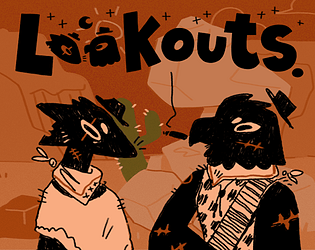
Lookouts is a 2D romance visual novel set in the old west, about two gay trans masc outlaws who meet in the desert while scouting the same town for their rival gangs. You play as one of the gang’s lookouts, sent ahead to check out a town with rumours of gold. Out on the dunes, far from everyone else, you run into another lookout doing the exact same job for another crew. Instead of a shoot-out, you get a slow, careful connection: tense small talk turning into real conversations about life, futures, and the possibility of leaving this all behind. The full version of Lookouts is a big expansion of the original jam build, with roughly 45,000 words of story and around 5–6 hours of reading time. It’s free / name-your-price on itch.io, available in multiple languages, and has an average rating close to perfect from thousands of players. Expect: gay furry cowboys, heart-squeezing conversations, and a lot of feelings about whether two people can carve out a better life together when the world is set up against them. Why this game is truly cozy A soft, hopeful take on the western Lookouts has all the visual flavour of a western – desert sunsets, dusty towns, guns on hips – but instead of grim tragedy, it leans into queer comfort and hope. Players often describe it as short, direct, emotional, and ultimately heart-warming rather than grim or cynical. Tender, explicit transmasc representation Both leads are gay trans masc outlaws, and the story treats that as central, not decorative. Their conversations about bodies, futures, and safety feel intimate and grounded, which is a big part of why so many trans players say it hit them hard in a good way. If you’re looking for affirming queer romance in a genre that usually forgets you exist, this is very much that. Slow-burn desert intimacy Most of the game is not big shoot-outs – it’s two people talking in the quiet: keeping watch, sharing stories, teasing each other, and slowly letting their guard down in the middle of nowhere. That calm, focused two-character energy is extremely cozy if you like character-driven stories. Warm art and a memorable soundtrack The art style is colourful and slightly soft-edged, making anthro cowboys and dusty cliffs feel inviting. The original soundtrack leans into that spaghetti-western feel without overwhelming the dialogue, and it’s available separately plus bundled with the Gold Edition if you fall in love with it. Accessible and relaxing to read Lookouts is designed to be easy to sit with: Simple, one-button controls (click / spacebar to advance) Browser and downloadable versions Accessibility tags like one-button and blind friendly Multiple language options (English, Spanish, French, Italian, Arabic, Brazilian Portuguese, Traditional Chinese, etc.) You can sink into it over a weekend or stretch it into several cozy evenings. Gameplay Breakdown Lookouts is a straightforward visual novel: you read, make choices, and watch how your dynamic with the other lookout evolves. A fateful meeting in the desert You’re introduced as a lookout for your gang, scouting a town with rumours of gold. Out on a remote ridge, you spot someone else doing exactly what you’re doing – and realise they’re from another gang. That standoff becomes the seed of the relationship. Long talks above a dangerous town As days pass, you keep meeting in that in-between space: far enough from both gangs to be semi-safe, close enough to remember you’re technically enemies. Dialogue choices let you decide how guarded, bitter, flirty, or hopeful you are. Learning what you have in common Gradually, you discover just how much you share: being trans in a hostile world, being tired of violence, being unsure if you deserve anything better. These talks are where the game shines – small details about family, scars, and dreams make both characters feel incredibly human. Tension as the gangs move in The closer your two crews get to actually hitting the town, the more pressure builds: - Do you warn each other? - Do you plan something reckless together? - Do you pretend this was just a nice distraction? Your choices here don’t create a dozen totally different endings, but they heavily affect how the key confrontation plays out. A climactic fight with multiple routes When things finally explode, the fight sequence has several distinct routes depending on your earlier decisions, with different pacing, beats, and unique CGs for each path. The broad outcome of the story stays consistent, but the way you get there – who moves first, who gets hurt, who steps in – changes, rewarding replays without punishing you with a bad ending. Through it all, there are no quick-time events or reflex tests; it’s all reading and choosing, at your own pace. Mini Tips Save before big turning points Drop a manual save before major scenes (new day in the desert, big emotional talks, the run-up to the fight) so you can hop back and see alternate versions without replaying from the start. Commit to a vibe on your first run On your first playthrough, answer honestly as your lookout – wary, hopeful, flirty, or cynical. On replays, you can lean harder into a specific tone to see different shades of the relationship and alternate fight routes. Revisit the climax at least once The final confrontation can play out in several different ways with unique art depending on your choices. It’s worth reloading a save and trying different answers just to see how differently that scene can land. Use the browser or download based on your mood The browser version is convenient but can take a little while to load. If you plan to read for a few hours, the downloadable version is usually smoother. Take breaks if the themes hit close to home Even though the story is ultimately hopeful, it touches on gun violence, injury, transphobia, and racism. If you’re sensitive to those topics, treat it like a heavy book: read a chapter, then get some water and breathe. FAQ Is Lookouts stressful? Moment-to-moment, no: there’s no timer, no game-over reload screens, and no mechanics pressure. The stress is purely emotional – old-west gunfights, life-or-death choices, and whether two people can make it out with their hearts (and bodies) intact. If you’re okay with that kind of drama, the pacing is more cozy than frantic. How long does Lookouts take to finish? The full story is around 45,000 words, with most players taking about 5–6 hours to complete one playthrough. If you go back to see all the variations on the final act, you can easily spend a bit more time with it. Are there multiple endings? Structurally, the overall ending stays consistent so you don’t have to fear accidentally locking yourself into a tragic route. What your choices mostly change is how the big confrontation plays out – there are several different fight routes, each with its own art and emotional emphasis. What platforms and languages does it support? Lookouts is available on: Browser (HTML5) Windows Android Languages currently include English plus several others (like Spanish, French, Italian, Arabic, Brazilian Portuguese, and Traditional Chinese), with more translations being added over time. Is Lookouts free? Yes. Lookouts is name-your-price: you can play it for free, or tip the devs if you enjoy it. There’s also a Gold Edition that includes: High-res art from the game Extra wallpapers The full OST Mini comics and a development artbook What content warnings should I know about? The devs list the following content warnings: Alcohol and smoking Gun violence and gun death (with SFX) Blood and injury (not graphically described, but present in text and visuals) Mild transphobia Discussions of racism and settler violence If those themes are uncomfortable or triggering, read cautiously or skip this one. If you’re into queer narrative games, soft-but-intense romance, and old-west vibes without the tragic ending, Lookouts is a beautiful, emotionally cozy read that sticks with you long after the credits.

Novel
游戏封面: Snug

Snug

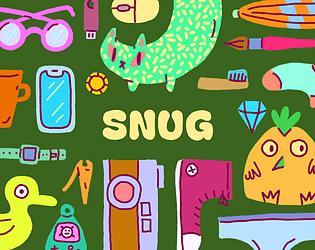
Snug is a cozy packing game about organizing everyday items into bags. It’s part block-stacking puzzle, part inventory management, with a very satisfying dash of physics. Each level gives you a new bag shape (or something bag-adjacent) and a pile of stuff that definitely shouldn’t all fit… but somehow does. You drag, rotate, stack, and squeeze items until everything sits snugly in place: kettlebells, ukuleles, beach towels, cats, axes (for some reason), and more. The current free prototype is short but replayable: a handful of thoughtfully designed bags, vibrant hand-drawn art, and a relaxing soundtrack that a lot of players say helped them calm down, unwind, or get through a rough moment. A fuller Steam release is planned, with more levels, co-op, and extra features. Why this game is truly cozy Low-pressure, high-satisfaction puzzles There’s no timer, no score attack, and no penalty screen. You can take as long as you like to nudge, rotate, and re-pack your items. The tension is that “can I really make this all fit?” feeling — and the payoff when it finally clicks into place. Real-life vibes, zero real-life stress Snug perfectly captures that “packing for a trip” energy without the airport anxiety. Players compare it to putting their mum’s luggage-packing lessons to the test, or finally defeating the backpack that usually wins in real life. Here, you get all the little victories and none of the stress. Warm, minimalist art and sound The art style is clean, colourful, and cozy; items are easy to read but still charming. The music and sound design are soft and comforting — multiple players specifically mention that they never play with sound on, but kept it on for Snug because it made them feel calmer and happier. Physics that feel playful, not chaotic Balls bounce, balloons float, lamps wiggle out of your grip — the physics make the bags feel alive without turning the game into a mess. You’re not fighting randomness; you’re using the motion to nest items into just the right gaps. Easy to pick up, easy to replay You can learn the basics in seconds: click, drag, rotate, jiggle. The prototype is short enough for a single cozy session, but many players immediately replay to try different packing orders, or just because the act of packing is so satisfying. Gameplay Breakdown In Snug, each level is essentially a little story told through a bag: Choose a bag and meet its owner (through their stuff) Each stage gives you a new bag shape and a theme: a beach trip, a cat carrier, a mysterious traveller with questionable tools (hello, giant axe). The items themselves hint at who this person is and where they’re going. Drag, rotate, and nest items together You move items with the mouse or trackpad, rotate them, and try to tuck them into corners and gaps. Heavy objects anchor piles; long and thin items bridge spaces; small items fill the tiny holes that are left over. Use physics, spin, and “jiggle” to settle the load Some bags and items wobble when you let go. You can “jiggle” or shake the bag (on keyboard, spacebar also works) to let things slide and settle into better positions, then fix them with more careful adjustments. Respect each bag’s quirks Later (and in the upcoming Steam version), bags can have odd shapes, twists, or holes. Some aren’t even bags at all. You adjust your packing strategy to the personality of the container: what can fall through, what rolls away, what needs to be pinned down. Finish the bag and move on to the next life snapshot When everything fits within the outline and stays put, the level completes. You get a small wave of “packing brain” satisfaction and then move on to the next themed bag, with a completely different set of items and layout challenges. The Steam version adds more structure on top of this core loop: Local co-op (up to 4 players) where everyone has a pointer and can pack together Unlockable pointer icons for completing special tasks Optional dual-language item names, so you can learn words for everyday objects in another language while you play Mini Tips Start with the biggest, heaviest items Drop in things like kettlebells, shoes, or boxes first. They act as anchors you can build around, instead of trying to cram them into tiny gaps later. Use rotation to “key” objects into place Many pieces are subtly designed to lock into each other at specific angles. If something almost fits, rotate it a few times — there’s often a perfect orientation. Jiggle to discover hidden space A quick shake can reveal micro-gaps you didn’t realise were there as items settle more tightly. Just don’t rely on jiggling alone; it’s best as a finisher after thoughtful packing. Think in layers, not rows Try stacking flat items like books, towels, or laptops to create a new “floor” for smaller objects, instead of treating everything like Tetris blocks on the bottom. Play how you pack in real life Neat stacker? Chaotic crammer? Colour matcher? Snug doesn’t force a single “correct” solution, so lean into your natural packing style and see what the game lets you get away with. FAQ Is Snug stressful? No. Snug is designed as a calming, no-pressure puzzle experience. There’s no time limit, no failing grade, and no loud consequences — just gentle physics, cozy art, and the quiet satisfaction of making everything fit. How long does Snug take to play? The current free prototype is short and sweet — most players finish it in one relaxed session, then replay their favourite bags or try new packing approaches. The full Steam version is planned to add more bags, more levels, and more playtime. Is there only one correct solution per bag? No. A core design idea in Snug is “pack your way”. As long as everything fits and stays inside the outline, it’s valid. The joy is in finding your neat solution, not copying a single intended answer. Can I play Snug with friends? The browser/itch prototype is primarily a solo experience (though nothing stops you from back-seat packing with a friend). The upcoming Steam release will support 1 to 4 players in local co-op, so you can pack bags together on the same screen. Do I need a powerful PC or a controller? No. Snug is lightweight and runs in a browser or as a small download. It’s mouse/trackpad based and doesn’t need a gamepad. The future Steam build will still be very accessible in terms of hardware. If you love cozy puzzle games, packing/organizing sims, or just the oddly specific joy of making impossible luggage work out, Snug is a perfect little addition to your cozy-game playlist.

Puzzle
游戏封面: Little Chef

Little Chef

Little Chef is a cozy, 2D physics-based cooking game all about experimentation and discovery. You stand in a tiny illustrated kitchen, drag ingredients into a big pot, and see what kind of recipe (or disaster) you’ve just invented. Inspired by games like Potion Craft and classic mix-and-match alchemy games, Little Chef turns cooking into a playful puzzle: up to five ingredients per dish, hundreds of possible combinations, and a recipe book that fills up as you unlock new dishes. Some are wholesome comfort foods; others are cursed, chaotic, or just very suspicious. It’s free to play in your browser or as a small download for Windows and macOS, with average sessions around half an hour — though the “just one more recipe” loop makes it very easy to stay longer. Why this game is truly cozy Zero time pressure, all vibes There’s no timer, no customers yelling at you, and no failing a level because you were two seconds too slow. You can experiment at your own pace, re-read the cookbook, or just stare at the cozy art for a bit. Players repeatedly describe it as “fun and cozy”, “relaxing”, and “so cutiee and fun to play”. Gentle brain work, not stress Little Chef is basically a cozy puzzle game with drag-and-drop mechanics. You’re using logic and pattern recognition (shapes and icons in the book, ingredient hints, recipe names), but the cost of failure is tiny: you get weird outcomes, laugh, and try again. Soft art and playful physics The illustrated kitchen feels warm and lived-in, with bouncy physics that make ingredients wobble, splash and bonk into each other in a very satisfying way. The vibrant, cute art and “amazing physics” are a big part of why the game feels so nice to play. Cozy story hidden in the recipes Little Chef isn’t just a sandbox — the recipe book acts like a tiny journal. Notes and descriptions hint at a story about the chef, her family, falling in love, having kids, and a later separation. You discover it slowly through the recipes, which adds emotional warmth without heavy cutscenes. Short, satisfying sessions With an average play session of about 30 minutes and a self-contained kitchen, Little Chef is perfect for “one cozy break” after work or before bed — but still deep enough that players create full documents of recipes because they can’t stop until they’ve found everything. Gameplay Breakdown Here’s what actually happens when you step into the kitchen: Explore your pantry and kitchen You start in a single-screen kitchen filled with ingredients: flour, eggs, butter, milk, salt, fruits, cheese, oats, chalk (yes), and more. Many items are tucked around the scene, so half the fun is hovering around to see what’s interactable. Drag ingredients into the pot Using simple mouse controls, you drag up to five ingredients into the pot. Little Chef’s drag-and-drop system is easy to understand even without a tutorial, which makes it welcoming even if you don’t usually play games. Cook, wait, and see what happens Once you’re happy (or curious) about your combination, you cook it and watch the pot respond with colourful effects. Sometimes you get a normal recipe. Sometimes you get a cursed one. Sometimes it’s… nothing, just smoke and confusion — which is its own kind of fun. Fill out your recipe book On the side of the screen, a cookbook tracks what you’ve discovered: - Normal recipes with comforting names - Cursed recipes with chaotic or goofy outcomes Clues in names and icons help you guess new combinations. Many players end up determined to “unlock all recipes” and share full lists online. Chase 100% completion or just vibe There’s no strict endpoint. You can play until you’ve: - Found every recipe - Pieced together the little story in the notes - Or simply had enough cozy kitchen time for the day Mini Tips Start with obvious comfort foods Think like a real-world chef: flour + egg + butter + cheese can become quiche; blueberries and bananas make fruit salad; swapping flour for oats gives you healthier takes like “healthy pancakes”. Those simple combos help you understand how the game thinks. Use the recipe book as a puzzle guide The book’s shapes, icons and names are deliberate hints. If you’re stuck, compare the silhouette of an unknown recipe to ingredients you haven’t tried together yet. Don’t be afraid of cursed recipes Some of the funniest outcomes come from dropping non-food or odd combinations into the pot. Little Chef wants you to be a bit chaotic — disasters still help fill the book. Expect to Google once or twice You might find yourself looking up “what is ghee?” or checking real-world recipes. It actually makes the game feel a bit like playful cooking research. Keep an eye on your real-world clock The kitchen has no timer, but your day does. It’s very easy to say “just one more recipe” and suddenly realise you’ve been hunting for quiche or mug cake solutions for an hour. FAQ Is Little Chef stressful? Not really. There are no timers, no angry customers, and no game-over screens — just experimentation, soft art, and gentle music. Mistakes turn into weird recipes, not failures. Most players describe it as cozy, relaxing, and “fun and cute”. How long does a typical session take? The average session is about half an hour, but completionists easily play longer while chasing every last recipe and story note. Is Little Chef beginner-friendly? Yes. The drag-and-drop cooking system is easy to understand even without reading instructions, and the cozy pacing makes it great for new or tired players who just want something low-pressure. Where can I play Little Chef? Little Chef: Prototype is available free on itch.io, playable in your browser (HTML5) or as small downloads for Windows and macOS. Controls are mouse-only, so you don’t need a controller or powerful PC. Is there more coming after the prototype? Yes. The team is working on a bigger follow-up with more recipes, more chaos, and deeper kitchen puzzles. There’s already a free demo on Steam if you want to see where the cozy cooking journey is headed next.

Management
游戏封面: An Average Day at the Cat Cafe

An Average Day at the Cat Cafe

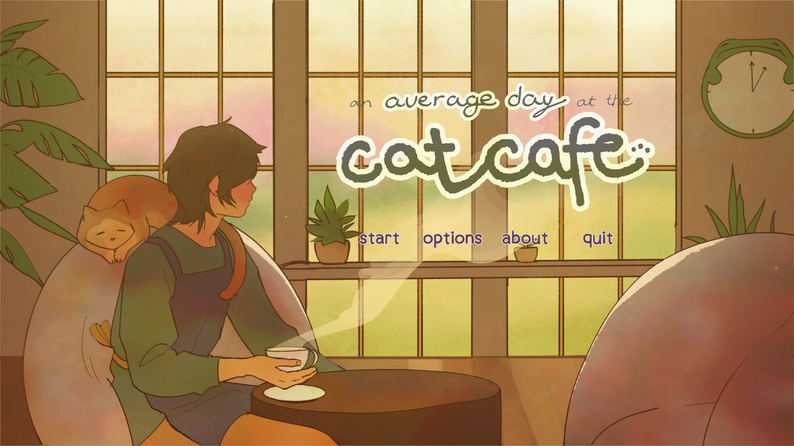
An Average Day at the Cat Cafe is a cozy, slightly surreal cafe management game where you run a tiny cat cafe that serves everything from lattes and mango boba to egg toast and… toilet paper for mysterious night guests. By day, a line of cute animals — cats, ducks, frogs, bears and other odd little creatures — forms outside your shop, each ordering specific drinks and snacks that you have to prepare to perfection. By night, things get weirder: unsettling beings shuffle in with strange requests, turning your wholesome cafe into something quietly uncanny. It is a browser-based HTML5 game (with Windows and macOS downloads) from artist–developer Angela He (zephyo) and collaborators, praised for its watercolor-like art, adorable character designs, and addictive “just one more day” flow. Why this game is truly cozy Soft, pastel art with tons of personality The cafe, its residents, and its regulars all look like they walked out of a gentle storybook: light lines, pastel colours, and expressive little faces. From buff gym cats who love mango boba to elderly frogs with cane in hand, every customer feels like a tiny character sketch you want to know more about. Familiar restaurant-sim comfort If you ever loved old Flash-era restaurant games, this is that feeling distilled: juggling orders, assembling drinks in the right order, and rushing from fridge to stove to counter. The loop is simple, repetitive in a good way, and very easy to sink into. Quietly strange, in a good way Underneath the cute surface is just enough weirdness to keep things interesting. Late-night shifts bring in odd customers with bizarre orders, and the world feels slightly off in a way that’s more intriguing than scary — perfect if you enjoy cozy games with a hint of Halloween energy. Short, snackable sessions Each in-game “day” is a self-contained burst of hectic service. You can play a few days in a row, then close the tab and come back later without worrying about save files or long-term meta systems. It’s ideal as a low-commitment break. Relaxing… but engaging enough to be satisfying The combination of adorable art, fun sound design, and a straightforward control scheme makes it relaxing — but the orders can get complex enough to feel genuinely challenging. Many players describe it as “cute but kinda stressful” in a way that keeps them focused without feeling punished. Gameplay Breakdown At its core, An Average Day at the Cat Cafe is all about taking orders, making drinks and food correctly, and keeping the line moving. Open the cafe and meet your regulars You play as the human owner of a small cat cafe with one resident cat and a surprisingly long queue outside. Customers arrive one at a time and show their order as icons above their heads. Move around the cafe to gather ingredients Using keyboard controls and a few interaction keys, you dash between: - the fridge (milk, eggs, bread, boba, fruit and more) - the coffee station (espresso machine, milk frother) - the stove (for toasting and frying) - the ice station and sink Different orders require different tools and containers, so you’re constantly planning a little route through your compact kitchen. Assemble drinks and snacks in the correct order Getting the right ingredients, containers, and sequence matters. A few common examples: - Latte: grab a mug, pull espresso from the machine, add milk, then froth it. - Iced latte: grab a cup, add ice, pull espresso, then add and froth milk. - Egg toast: take egg and bread from the fridge, cook both on the pan, then move them to a plate before serving. If you add the wrong ingredient or use the wrong container, you’ll end up with a “bad” version the customer won’t accept. Keep the queue under control Customers don’t have visible timers, but they will leave if you take too long or serve them incorrectly — and when the first one storms out, everyone behind them can leave too. It quickly becomes a balance of: - reading orders in the right sequence - avoiding overcomplicating your current task - not letting a single tricky order block the entire line Survive the night shift As you stay open later, the clientele changes. Strange beings arrive with unsettling silhouettes and offbeat requests (like toilet paper instead of coffee). The core gameplay stays the same — read the order, make it correctly — but the atmosphere shifts from cozy cafe to “odd little liminal diner”, giving late-game runs a unique flavour. There’s no overarching story or long-term upgrade tree: you simply play through as many days as you can, then start fresh the next time you load the game. Mini Tips Learn a few key recipes early Lattes, iced lattes, mango boba, and egg toast appear a lot. Memorising those combos first will dramatically reduce panic when the queue gets long. Always grab the right container first Many mistakes come from mixing up mugs and cups. Get in the habit of picking the container based on whether the drink is hot or iced before touching any machines. Don’t overload your mental queue Focus on one customer at a time. Fully finish the first order in line before worrying about the next, or you’ll end up half-making several things and losing them all. Watch your cooking time Toast and eggs can burn if you forget them on the stove while you chase another ingredient. Try to stay near the pan while something is cooking instead of running across the cafe. Treat failure as part of the fun Orders will be messed up, lines will storm out, and some nights will go completely off the rails. Runs are short, so it’s easy to laugh it off and start a new day. FAQ Is An Average Day at the Cat Cafe stressful or cozy? It’s both. Visually and thematically it’s very cozy — soft art, cute animals, soothing colours — but the actual gameplay can be hectic, especially as orders stack up. Think “cozy restaurant sim with light time pressure” rather than a totally chill idle game. How long does a typical session take? A single run can last anywhere from a few in-game days to a longer stretch if you’re quick and accurate with orders. In real time, most players use it for sessions of 15 to 45 minutes, replaying multiple runs rather than marathoning one endless save. Is there a story or progression? There’s no deep narrative or permanent progression system. You unlock new ingredients and see new customers as the days go by, and the tone shifts at night, but each time you come back to the game you essentially start a fresh cafe. What platforms can I play it on? The game runs in your browser (HTML5) and also has downloadable builds for Windows and macOS. It’s lightweight and works well on low-end PCs and laptops. Is the game free? Yes, it is pay-what-you-want on itch.io: you can play it for free or support the developers with a tip if you enjoyed your shift. How spooky is the night content? The night customers and their requests can be a little unsettling or dark-humoured, but there’s no graphic horror. If you’re very sensitive to creepy imagery, you can simply stop playing before the cafe gets too late into the night, or treat it as a slightly eerie twist on an otherwise cozy game.

Management
游戏封面: Happy Cat Tavern

Happy Cat Tavern

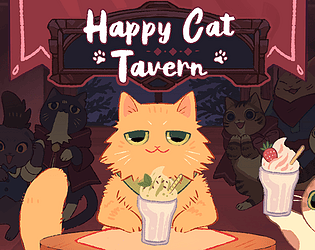
Happy Cat Tavern: Typing Challenge is a cozy, cat themed typing game where every correctly typed word becomes a milkshake for Batou, a cheerful yellow cat holding court at his favourite tavern. Words appear one after another on screen; type them quickly and accurately and Batou downs glass after glass while the crowd of cats in the background cheers you on. Miss too many, and the round ends with a clink of unfilled glasses. It is simple to pick up but surprisingly hard to master: short sessions, a clean interface, and very cute art make it feel like a browser toy, but rising word speed and longer vocabulary quickly turn it into a genuine typing workout. The game runs in your browser or as a Windows download and is rated highly on itch.io as a cozy little favourite for both cat lovers and typists. Why this game is truly cozy Cats, milkshakes, and tavern vibes Happy Cat Tavern turns a basic typing test into a tiny, animated cat bar. Batou sits at the counter chugging milkshakes while other cats watch from the background and react to your streaks. It feels more like hanging out in a friendly tavern than taking a skills assessment. Short, low commitment rounds Most runs only last a few minutes. You can jump in for a quick break, play a round or two, and then get back to whatever you were doing. It is perfect as a five minute palate cleanser between tasks, study sessions, or other games. Simple to learn, satisfying to improve at The rules are incredibly straightforward: see word, type word, earn points. There are no complicated key combinations or systems to memorise. The challenge comes from improving your speed, accuracy, and stamina across longer chains, which feels very satisfying over time. Warm, polished art and feedback The cats are beautifully drawn, with soft colours and charming animations. Empty glasses stack up on the bar as you play, the audience cats get more excited during streaks, and even failure feels gentle rather than harsh. Comments from players often mention how cute and well drawn it all is. Cozy productivity boost Because it is both relaxing and skill building, Happy Cat Tavern hits a rare sweet spot: you feel like you are training something useful while still unwinding. Writers and students specifically mention using it to warm up their fingers and get into a typing flow before working. Gameplay Breakdown Happy Cat Tavern focuses on fast, accurate typing wrapped in a very simple loop: Step into the tavern When you start a run, Batou the cat sits at the bar with an empty counter and a line of milkshake glasses ready to pour. A single word appears near the top of the screen. Type words to serve milkshakes Your job is to type each word exactly as shown before the timer ring around it runs out. Complete the word and Batou drinks a milkshake, an empty glass stacks on the bar, and you earn points. Mistype or run out of time and you lose the glass and your current streak. Face faster words and growing pressure As you progress, the time allowed for each word shrinks and the words themselves get longer and trickier. Early rounds might give you short, common words; later ones will throw in longer or less familiar ones that test your accuracy under pressure. Choose between multiple difficulty modes The game offers several difficulty levels plus an optional mirrored mode where the words are displayed reversed on screen but you still have to type them in the normal order. Higher difficulties ramp the speed and complexity, turning the cozy tavern into a full workout for experienced typists. Track stats and chase achievements At the end of a run you see stats like score, level reached, and accuracy percentage. There are achievements tied to reaching certain levels, keeping high accuracy, and exploring the different modes, giving you long term goals beyond a single quick session. Between runs you can switch between browser play and the downloadable version, adjust difficulty to match your current energy, and slowly push your high scores higher. Mini Tips Prioritise accuracy over speed at first A stable, high accuracy rate will naturally lead to better scores than mashing keys and making lots of mistakes. Find the right difficulty for your mood Use easier modes for a relaxing break and harder ones when you are in the mood to really test your typing. Look at the whole word, not letter by letter Try to read the entire word once, then type from muscle memory. This helps with flow and makes you less likely to get stuck halfway through. Take short breaks between long runs Your hands and wrists will thank you, especially if you are already typing a lot for work or school. Play in short bursts Happy Cat Tavern is designed for a few quick runs at a time. Treat it like a cozy mini-game, not something you grind for hours in one sitting. FAQ Is Happy Cat Tavern stressful or cozy? Despite the timer on each word, the game feels more cozy than stressful for most players. The art is cute, the feedback is gentle, and there are no harsh penalties beyond ending the round when you miss too many words. If you dislike time pressure, sticking to easier difficulties keeps it very relaxed. How long does a typical session take? An average run only lasts a few minutes, especially when you are still learning. Because it is so fast to restart, many people end up playing multiple rounds back to back and turning it into a ten to fifteen minute typing warm up. Is Happy Cat Tavern good for learning to type? Yes. It is not a full structured course, but it is excellent for practising speed, accuracy, and staying calm while typing under light pressure. Many players say it helped them improve their everyday typing or warmed them up for writing. What platforms is it available on? Happy Cat Tavern runs in your browser as an HTML5 game and also has a Windows downloadable version. Different portals may host it, but the itch.io page is the main home, with both play in browser and download options. Is the game free? The game is effectively free and set up as name your own price. You can play without paying, and optionally support the developer with a tip if you enjoy it. Who is Happy Cat Tavern best for? Anyone who likes cats, cozy browser games, and little skill challenges will probably enjoy it. It is especially nice for people who spend a lot of time typing already and want a playful way to practise without staring at a dry typing test.

Management